Remove Zhirinovsky Ransomware

The Zhirinovsky Ransomware is a new and dangerous file-encryption Trojan. Its anonymous creators are choosing to spread it through pirated content, fake downloads, and malicious email attachments. In addition to avoiding shady downloads, you can also protect your system and data from the Zhirinovsky Ransomware by using reputable antivirus services.
What Does Zhirinovsky Ransomware Do?
When this file-locker infiltrates a system successfully, it will immediately launch a file-locking attack. It targets a long list of file formats, encrypting their contents. Some of its common targets are documents, media, databases, archives, etc. When it locks a file, the ransomware adds the '.Zhirinovsky' extension to its name. Of course, the attack ends by creating the ransom document '#Decrypt#.txt.' This file tells victims to abstain from trying alternative data recovery applications.
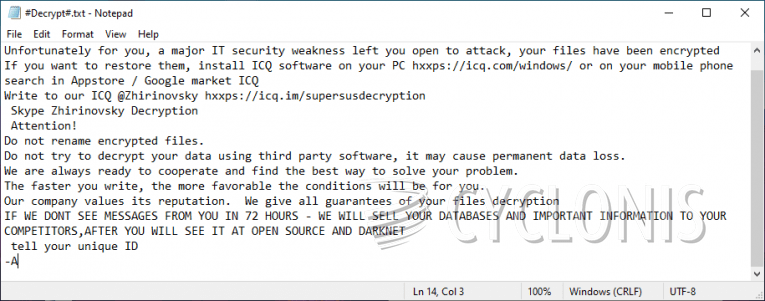
The attackers warn them that trying to restore their data via 3rd-party tools might permanently damage these files. The criminals go on by saying that victims must message the ICQ handle @Zhirinovsky in order to purchase a working decryptor. Just like other ransomware operators, the ones behind this project also ask for the money to be sent via Bitcoin.
We assure you that the operators of the Zhirinovsky Ransomware are not to be trusted. If you meet their demands, they will still be able to easily scam you out of your money. Do not send them anything. Instead, run an anti-malware tool to eliminate the Zhirinovsky Ransomware from your device. After this, experiment with alternative data recovery techniques and tools.