Remove Ver Ransomware
The Ver Ransomware is a new, rebranded version of one of the most infamous ransomware families, Dharma. The Dharma file-locker has been around for over three years, and thousands of users have fallen victim to its attacks. Unfortunately, the Ver Ransomware is not decryptable via free utilities, and users affected by its attack will have a hard time recovering their data.
How Does the Ver Ransomware Attack Users?
When this ransomware infiltrates a system successfully, it will execute a rapid file-encryption attack. This process aims to encrypt the contents of important files – documents, media, archives, databases, backups, and many others. Whenever it locks a file, it will modify its name by appending an extension that follows the usual pattern of the Dharma Ransomware – '.id-<VICTIM ID>.[quacksalver@onionmail.org].ver.'
Of course, victims of the Ver Ransomware will also find a ransom message from the criminals. This information is stored in the document 'info.txt' that the threat drops after completing the file-encryption task.
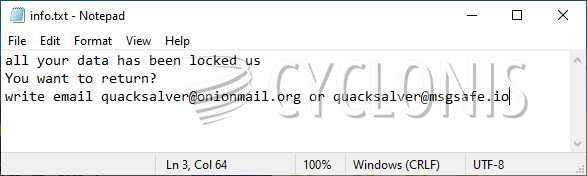
According to the ransom note, victims can purchase a decryptor after contacting the attackers. This can happen through the email addresses quacksalver@onionmail.org and quacksalver@msgsafe.io. It is important to mention that Ver Ransomware's creators offer no proof that they are able to unlock the damaged files. It is possible that they might be planning to ask users to complete a ransom payment, and then scam them out of their money. It is never a good idea to co-operate with the criminals behind ransomware attacks. Instead of agreeing to pay Ver Ransomware's authors, we advise you to try to resolve the situation through legitimate, and less risky means. Start by running an antivirus application to terminate the Ver Ransomware, and remove it fully. After this, try out alternative data recovery tools and options.