Remove C1024 Ransomware
The ransomware field has been dominated by the STOP Ransomware family over the past few year. However, an older file-locker family appears to be making a comeback – the Dharma project. Recently, we reported of the Ver Ransomware, which was identified as a new version of the Dharma Ransomware. Another report brings the C1024 Ransomware to our attention – yet another new version of the Dharma file-locker.
Unfortunately, the C1024 Ransomware appears to be a very secure threat, which uses an irreversible file-locking mechanism. The only way to undo the damage that this threat causes to files is to run a specialized decryptor paired with the unique decryption key that the C1024 Ransomware generates for each victim. Unfortunately, this piece of information is not available to the public – only the ransomware's operators have access to it.
C1024 Ransomware Modifies the Contents and Names of Files
When the C1024 Ransomware infiltrates a machine, it will encrypt files on the hard drive and removable storage devices. It is able to work with a wide range of file formats, ensuring that its attacks will always inflict the maximum amount of damage. All files that this threat damages will have their names tagged with the suffix '.id-<VICTIM ID>.[code1024@keemail.me].C1024' – making it easy for victims to recognize the malware.
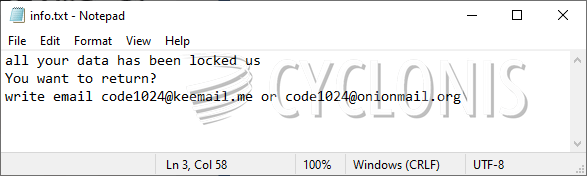
The message of the criminals says that victims will be able to get their data back only if they purchase a decryption service. The price of the latter is not listed. However, older variants of Dharma asked victims for over a thousand dollars, so it is safe to assume that C1024 Ransomware's situation might be identical. The last bit of information that the criminals are provide are the emails for contact – code1024@keemail.me and code1024@onionmail.org.
If the C1024 Ransomware has damaged your data, you should use an anti-malware scanner to eliminate the infection. After you do this, try to run alternative data recovery tools.