Remove Aimnip Ransomware

Attacks of file-encryption Trojans can often have devastating consequences for your files. These threats are spread online with the help of various tricks and techniques. Often, users encounter them when trying to download cracked games or pirated software, but it is also possible to receive malware through emails. Needless to say, when dangerous files can come from multiple directions, it is best to rely on automated defenses. Modern malware like the Aimnip Ransomware can be stopped with the use of up-to-date antivirus software.
How Does the Aimnip Ransomware Attack?
Just like other file-lockers, this one also starts off its attack by working in the background. This way, it ensures that users will not be able to stop it before it causes enough damage to their data. The attack focuses on encrypting the contents of popular file formats – media, databases, archives, documents, and others. Once it locks a file, the Aimnip Ransomware will apply a random extension to its name. Typically, this suffix includes four random characters.
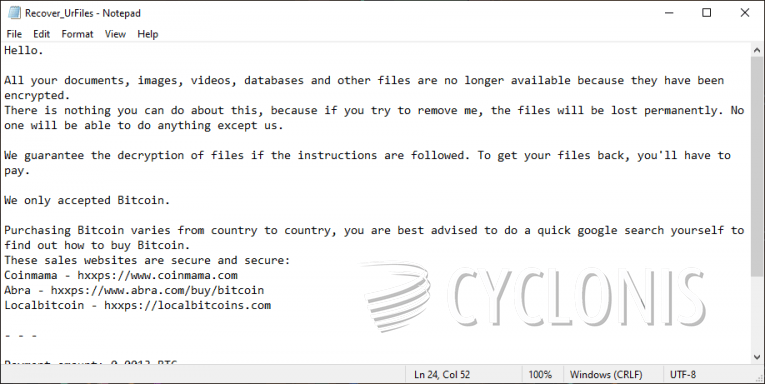
After the attack is finished, the 'Recover_UrFiles.txt' ransom note is created. This document sheds some light on the attack, and informs victims that they can purchase a decryptor. However, the decryption tool is not free – it costs 0.0013 Bitcoin, which is about $70 at the moment. The criminals also provide the following email for contact – aimnip@via.tokyo.jp. We advise you not to consider the offer of the criminals. They offer no proof that they have what it takes to restore your files. Also, if you send Bitcoin to their wallet, you will be unable to reverse the transaction if they opt to scam you. Instead of risking your hard-earned money, you should use an anti-malware tool to dispose of the Aimnip Ransomware. After you remove the threat, experiment with reputable data recovery software and methods.