Remove F1 Ransomware

If you cannot access your files, and you notice the '.f1' extension at the ends of their names, then you might be in big trouble. These two symptoms are typical for the attack of the F1 Ransomware, a dangerous file-encryption Trojan. Threats like this one encrypt the files of their victims and then offer to unlock them for money. The ransom fee may vary, but it is usually at least a few hundred dollars, which the crooks ask to receive via Bitcoin or another cryptocurrency. Payments of this type are very risky since you will be unable to reverse or cancel the transaction in case F1 Ransomware's creators try to scam you.
This file-locker belongs to the NEFILIM Ransomware family. Sadly, this does not change much about the attack – there is no free way to counter F1 Ransomware's encryption. The only reliable way to get the files back is to restore them from a backup. Understandably, many victims might not have access to a backup copy of their data. Another recent variant of this threat is the KIANO Ransomware.
F1 Ransomware, A New NEFILIM Variant, Can be Very Dangerous
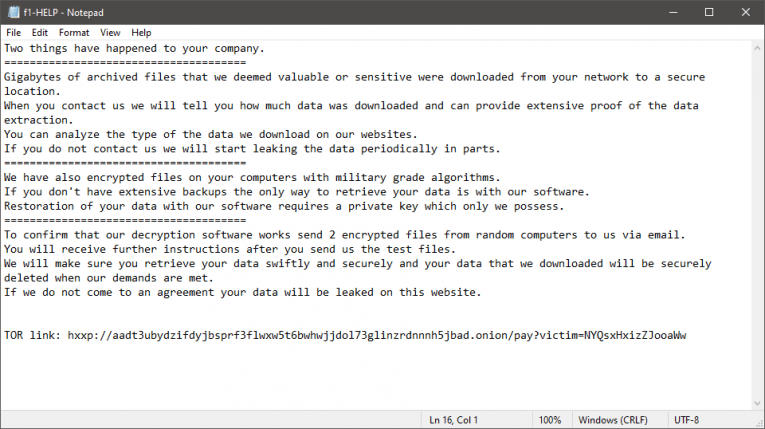
What do you do if the F1 Ransomware has taken your data hostage? Needless to say, trying to co-operate with the attackers is a bad idea. They might try to scam you, and there is no guarantee that you will get anything after paying the ransom fee. Their full instructions can be found in the file 'f1-HELP.txt.' The note instructs victims to visit a TOR-based payment page. Instead of listening to cybercriminals, you should take control of the situation by running an up-to-date anti-malware tool. This way, you can remove F1 Ransomware fully, and prevent it from damaging more files.
Once the threat is gone, you can proceed to restore files from a backup, use data recovery software, or experiment with other file restoration options.